
As an email marketing manager, it's crucial that your emails reach your recipients' inbox — not the spam folder.
27. januar 2026
If you work in marketing and cannot face reading long texts about technicalities, I have two quick recommendations for you:
A. Send an email to me at [email protected] and ask me to check your setup. I am happy to do it quickly and entirely free of charge.
B. Use our very simple form to check whether you have the optimal DMARC policy on your domain.
That single check is far from telling you whether everything is as it should be – but if this is right, there is a good chance you already have the rest in order too.
If we look at the big mail providers like Google and Microsoft, they place great weight on each sender's technical setup being correct.
If you use a professional email marketing solution, the basic technical setup is in order as a rule – but even with the professional providers there are a few things you have to take care of yourself if your setup is to be entirely optimal.
The most important technical factors are:
That you send from a domain which is active and set up to be able to receive mail.
That the code in your newsletters is free of errors and contains both an HTML and a text version (html/multipart).
That you have an SPF record on the domain you send from, which authorises the mail server you send from.
That your mail is “signed” with DKIM, which is also set up correctly on the domain you send from.
That you have DMARC set up on the domain you send from, and that your mails validate correctly (very briefly, DMARC is used to confirm that you have set up both SPF and DKIM correctly). In your DMARC setup you define a policy yourself for how the recipient should treat mails that do not validate correctly. A strict policy protects your domain better, but has no bearing on whether you end up in spam or not.
Since February 2024 the 5 points above have been a requirement for everyone sending at least 5,000 mails a day to Google and Yahoo mail servers.
Google and Yahoo have previously stated that they only require a policy, not what the policy contains.
Both in our own dialogue with YouSee in Denmark and from other sources, we have been told there is a significant risk of mails to recipients on their mail servers being blocked if no policy is defined to either quarantine or reject unverified mails.
For that reason alone, anyone sending mail to Danish recipients should make sure they have a DMARC policy that, in technical language, is either:
p=reject
or
p=quarantine
"Reject" tells the recipient's mail provider to reject mails if DMARC cannot verify that the sender is who they claim to be.
"Quarantine" tells the recipient's mail provider to quarantine mails if the sender cannot be verified via DMARC.
Every company should work towards having a good enough grip on the mails sent from their domain to be able to set p=reject.
When you have none or quarantine, you are effectively telling Google, Microsoft, YouSee and others that you do not quite have control over the systems sending mail from your domain.
There are a great many services offering DMARC monitoring and other email security services.
We use such services ourselves and think it is a very good idea to do so. At the time of writing, however, we will not recommend particular tools over others – and therefore will not link to any in this article. A Google search quickly turns up plenty of results – and you are always welcome to write to us for a concrete account of our experience.
Beyond SPF, DKIM and DMARC being a requirement from Google and Yahoo, since February 2024 they have also introduced the following requirements for high-volume senders:
Support for one-click unsubscribe, which happens directly in the mail client (without landing on the company's unsubscribe page) – see the image below.
A maximum of 0.3% spam complaints (some ESPs require a maximum of 0.1%. The average for Yulsn customers across all of 2023 was 0.03%).
TLS is required.
Valid forward and reverse DNS for sender IP addresses.
RFC 5322 must be followed.
We have made a short PDF guide with information about SPF, DKIM and DMARC that you can pass on to your IT people – along with a link to this article:
When your newsletter is assessed by a spam filter at an individual recipient, it happens on the basis of a long list of different criteria. The largest public mail providers – like Google and Microsoft – use highly advanced rules that even take into account how the individual recipient usually interacts with mail from different senders.
That means your newsletter can land in a spam filter for one Gmail recipient while another Gmail recipient gets your mail in the inbox.
Naturally no provider publishes anything about exactly how their spam filter works – that would only make it easier for "spammers" to get through.
There is, however, fairly broad agreement in the email marketing industry that how recipients of your newsletters usually interact with your mail – and having a correct technical setup – matters more today than the specific content of your mails.
Recipients who reply to your mail often have an even better chance of getting your newsletters in the inbox. That is one of several good reasons not to use a "no-reply" sender.
If you occasionally go as far as encouraging your newsletter recipients to reply to your mail, it can improve delivery to those who reply – and perhaps even improve your general delivery.
Here you can see a concrete example of how the built-in one-click unsubscribe looks in Gmail:
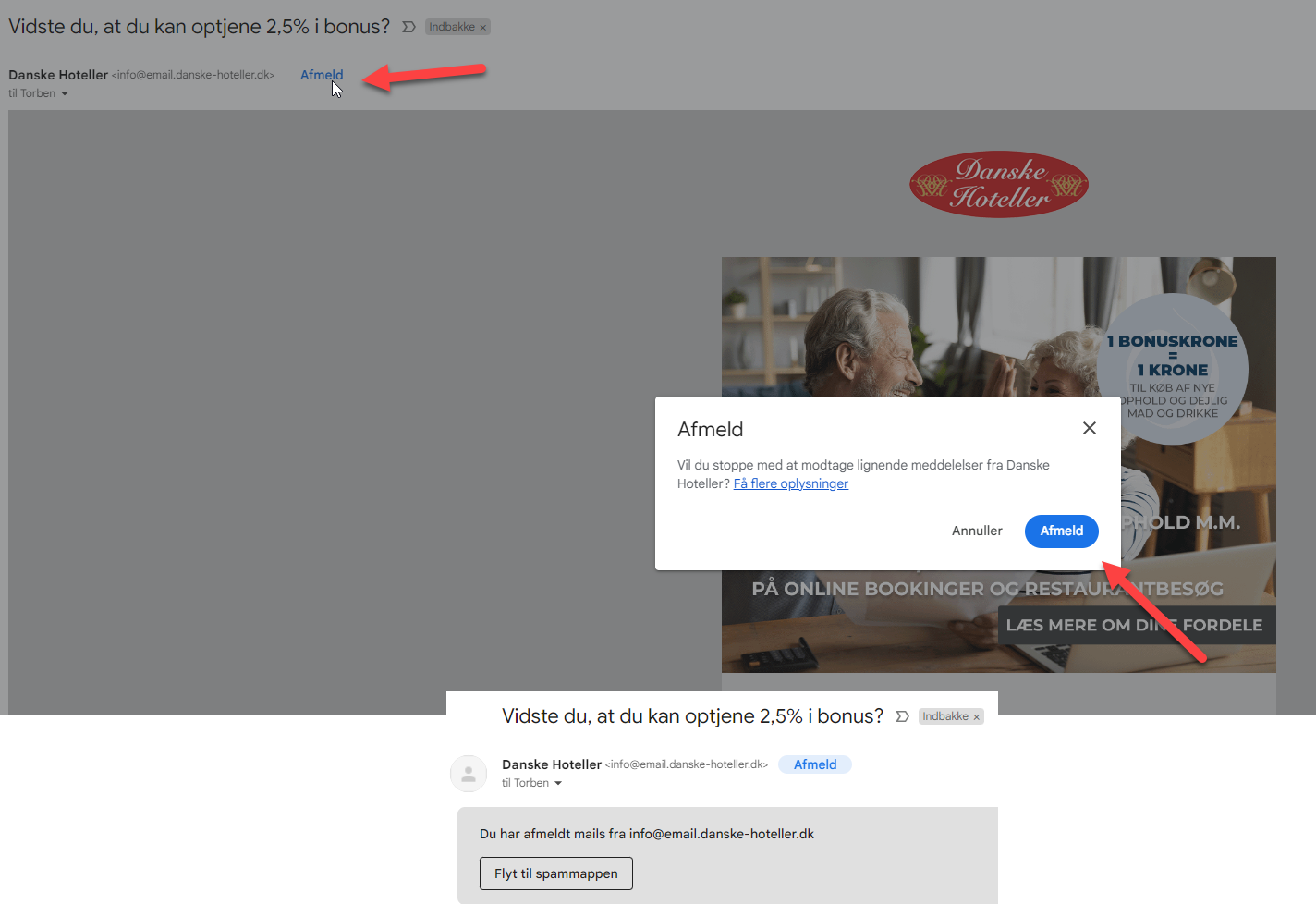
From a marketing point of view it has to be said that it is rather unfortunate that Google all but recommends moving unsubscribed mail to the spam folder by using their built-in unsubscribe.
Although it is up to the Email Service Provider (ESP) you use, it is your own responsibility (and your own problem if you do not meet the requirements) to have made the correct setup. Most ESPs have guidance for the setup, but only enterprise providers guide you all the way to the correct configuration.
Beyond one-click unsubscribe, in 2025 Google introduced easy access to unsubscribing from many newsletters at once.
Once the technical side is in order and you are fully focused on how you continuously strengthen your relationship with your recipients, you can look more closely at the remaining 18 tips that can help you minimise the risk of ending up in a spam filter.
If your mail server is blacklisted you will have major problems getting your mail through – especially to new readers. If that happens, you need to contact the site that blacklisted you. You can check your IP address's mail server here.
If you want insight into your general sender score, you should take a closer look at senderscore.org.
A number of companies offer various forms of ongoing or ad-hoc monitoring of your deliverability.
One of the large providers on the market is Validity, who aim particularly at enterprise customers – and sit at the expensive end. They offer a long list of services, including "Sender Certification", the purpose of which is to ensure better delivery to the large providers.
Whether the certification itself has any effect I would not like to say, but there is no doubt that deliverability benefits from paying close attention to all the requirements a certification programme contains.
There are also a fairly large number of companies offering various kinds of online service, more or less useful. There are many to choose from, and I will not recommend one over another, as what each offers changes all the time.
One of the general concepts on offer is monitoring of whether your mails land in the inbox, in spam, or in the various "tabs" the big mail providers have (Promotions in Gmail, for example).
That sounds extremely interesting at first glance – but this monitoring always happens via so-called "seed lists", and that makes the value of this particular reporting questionable.
A "seed list" is a list of mail addresses the provider of that service has created at Gmail, Yahoo and other mail providers in different countries. On those mailboxes they have then set up automated monitoring of where mails sent to those addresses end up in each mailbox.
Most mailing lists have well over half their recipients on mailboxes from Google, Microsoft or Yahoo – a typical large Danish mailing list, from retail or e-commerce for instance, often has 80%+ from Gmail and Hotmail alone.
Those large providers use a great many different rules to assess where mails should be placed for an individual recipient. Among those rules is how the individual recipient usually treats mail from each sender.
Recipients on a seed list do not behave like real recipients, and there is therefore no certainty that the result of a test is representative.
Often it is a fairly small number of mail addresses spread across different providers in different countries. It is quite normal for the statistics in some countries to rest on a single mailbox at a single provider.
Besides, I have yet to come across any of these services monitoring Nordic providers.
That said, it can still be worthwhile to use one of the tools for either ongoing or occasional monitoring.
Most tools also measure "SenderScore" at the same time and check the mail against general spam filters. So the tools do give a decent picture of whether there is anything worth looking into.
Here you can see an example of such a report, made with one of the cheaper tools (GlockApps):
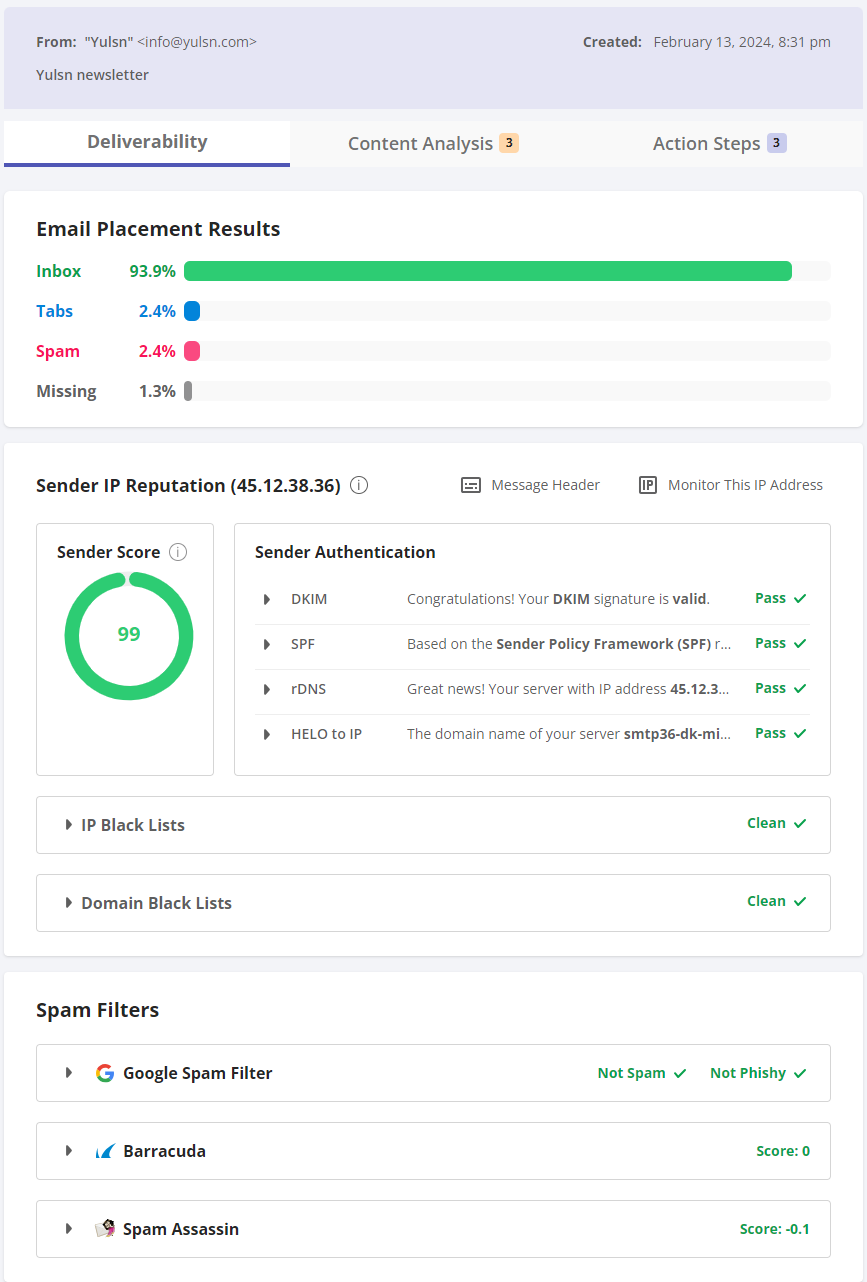
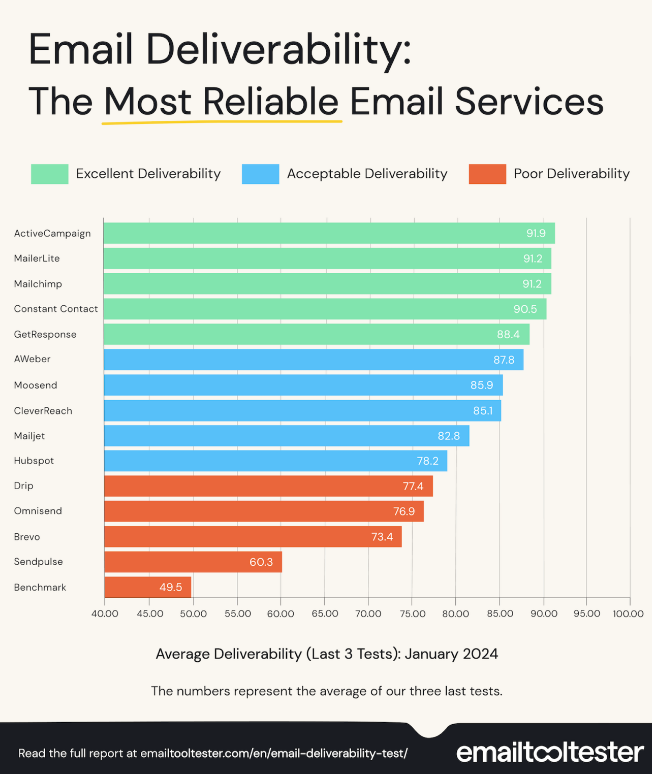
The "delivery rate" above for a newsletter sent with Yulsn Marketing Cloud of 96.3% (inbox + tabs) can be compared with a report made with the same tool by Emailtooltester.com in January 2024, where ActiveCampaign was the top scorer with a delivery rate of 91.9% 😀
When you use a professional email marketing solution, invalid mail addresses are blocked entirely automatically so you do not send to them again. It is important for your deliverability, however, that you also regularly delete recipients who have not opened or clicked in your mails for a long time.
The reason is closely tied to point 1 – that the better your open and click rates, the greater your chance of not ending up in the spam folder.
How often you should delete inactive recipients, and how much effort you should put into trying to reactivate them first, depends entirely on how often you send, how many inactive recipients you have – and how easy the process is to automate.
As inspiration, here is an example of an automated process we typically set up for those of our customers who send 2–4 mails a week, have many recipients and measured open rates of 40–60%:
After 90 days with no opens and no clicks, the frequency is reduced to a maximum of one mail a week.
After either 180 or 360 days (depending on typical purchase frequency), an automated reactivation flow of 3–4 mails with very untraditional subject lines is triggered.
The last mail in the flow carries a warning of deletion if there is no response.
If there is still no response 14 days after the last warning, the contact is deleted automatically.
– as soon as a recipient opens or clicks in a mail, they are regarded as reactivated and will receive newsletters at the same frequency as everyone else again.
NOTE! Since September 2021, recipients using Apple Mail with iOS 15 and macOS Monterey have been offered Apple's "Mail Privacy Protection". When your recipients accept Apple's protection, you will no longer be able to measure whether your mails have been opened.
The way they do it means some of your mails to recipients using Apple Mail will be recorded as opened even though the recipient has not actually opened the mail. So flows and tests based on opens are much less precise than they used to be.

"True double opt-in" means that those who sign up are only regarded as subscribed once they have received a confirmation mail AND clicked the link in it to confirm their sign-up. The process gives a high degree of certainty that those who sign up genuinely want to be subscribed.
If you use "true double opt-in" you cannot allow yourself to send a reminder to confirm the sign-up. You therefore typically lose 20–30% of sign-ups through this process.
Our recommendation is to build a welcome flow where there is no requirement to confirm in the first mail, but where a welcome flow of several mails is prepared and sent to new subscribers before they start receiving "ordinary newsletters".
An important part of the welcome flow is, in most cases, motivating the subscriber to tell you a little more about their preferences and needs, so there is also an opportunity to target the content of the newsletters better.
Subscribers who do not open or click in any of the mails in the welcome flow will then receive concrete prompts to confirm that they want to be subscribed to the newsletter. If they still do not respond, they can be given a final notice that they will now be deleted from the list if they do not react.
With a welcome process like this (instead of a "true double opt-in"), most people can both reduce the number of lost sign-ups and achieve far better results with the newsletters that follow.
NOTE! A good welcome flow is of course always our recommendation, whether you use double opt-in or not :-)
If you are only now getting your email marketing organised, you should not wait to send your first mail until you have collected a lot of sign-ups. Always send at least one welcome mail to every new subscriber immediately after they sign up, and start sending newsletters shortly after your "welcome flow" has finished.
If you build a large list without sending regularly, and then suddenly send to everyone at once, the risk of it being perceived as spam is greater.
If you move from one provider to another, you need to carry out a "warm-up process", which varies depending on how many recipients you have. That process is an article in itself...
A spam filter does not as such keep track of how often you send content to your recipients, but recipients can become irritated both by receiving mail from you too often and too rarely. And when your recipients get irritated, it is not far to the spam button...
So it is a good idea for your recipients to get a sense of your sending pattern very quickly, and for you to then stick roughly to what they expect.
If you then need to send extra mail for a period, it can be a good idea to "warn" about it in advance, and perhaps even give recipients the option of opting out of the extra mails.
If you live up to your recipients' expectations, it can be perfectly fine to send several times a day, just as it can be fine to send once a month.
Our general recommendation is that you send at least once a month – otherwise there are simply too many people who forget they signed up.

Errors in the HTML coding give a negative spam score. If you copy tables, or text and images, from Microsoft Word into your email marketing software, for example, extra code can easily come along that causes errors.
The ideal is to have a good mail template built in a professional email marketing tool, and to make sure the content you create in your day-to-day mails is produced in a way where faulty HTML cannot be introduced.
Do it that way and you have no need to test your mails on an ongoing basis at all – you only need to focus on it when you build new templates.
It is important for your spam score that the mails you send as newsletters always contain the following:
An unsubscribe link
The physical address of the company sending it
A mail address that can be replied to – ideally one where the "reply" button also works
A telephone number
A link to the sender's privacy policy.
If the ratio between text and images is heavily weighted towards images, that counts against you in the spam score. There is nothing wrong with a newsletter containing many images, but if there is almost no text, it increases the negative spam score.
If the HTML code for your mail takes up more than 102 kb, Google clips the bottom part of your content, so recipients have to click a link in the mail to see it all. The same can happen in other mail clients, and the limits can vary slightly – our recommendation is therefore 100 kb.
NOTE! The kb your images take up do not count, as images are physically loaded from the mail system's server. The 100 kb is therefore the maximum size of the physical HTML file.
If you receive a mail in Gmail, you can click "Show original" and save the whole mail from there as a .txt document. The size of that text document is roughly the size that counts.
Very long mails can incidentally also contribute to an increased spam score.
Another hallmark of spam mail is that it is proportionally stuffed with links. Make sure your mail contains plenty of text relative to your links.
Words and phrases like 'Save 50%', '100% free', 'Click here', 'Last chance', 'Hurry' and so on are among the expressions many spam filters give a negative score. If you write in English, the same applies to an even longer list of words and phrases.
BUT –many of the words that give a negative spam score are also among the words that can increase your response – especially if you sell goods in your mails.
Today individual words matter very little for your spam score. So you just need to make sure your mail is not stuffed with that kind of word.
"Important!!!!!", "Today's webinar has moved!!!!!", "Sign up here!!!!!" are not optimal ways of underlining your points. Exclamation marks can be used to emphasise the importance of your argument, but when it comes to avoiding a spam filter they should be kept to a minimum.
Do not use too many capital letters in the subject line or the content. Capitals can be used in moderation without increasing the spam score.
If a lot of your text is underlined or emphasised in bold, that also counts against you in the spam score.
If your content has many blank lines, repeated words or words with spaces between the letters (O F F E R), that also increases the risk of your mail ending up in a spam filter.
Red and green text is used in many spam mails to highlight warnings or offers. A spam filter will therefore register it too.
This is not an encouragement to stop testing your mails, because of course you should. Even so, the word 'Test' is actually among the words that risk getting your mail caught by a spam filter. If your test mail does not arrive, you can look for it in your spam filter and mark it as not spam.
Here are 3 of the most widely used online services for testing mails:
Let this last point serve as a kind of disclaimer. We obviously cannot guarantee that you will not run into trouble with the law or a spam filter simply by following this article, but if you follow the first 19 points you are very well on your way.
In relation to Danish legislation, you can check the latest guidance at forbrugerombudsmanden.dk.